Stop scrolling reviews. Start reading verdicts.
CheckMyStay reads every guest review on a Booking.com hotel page and hands you the good, the bad, and one honest verdict — in about ten seconds.
FreeYour first month: 30 hotels, no card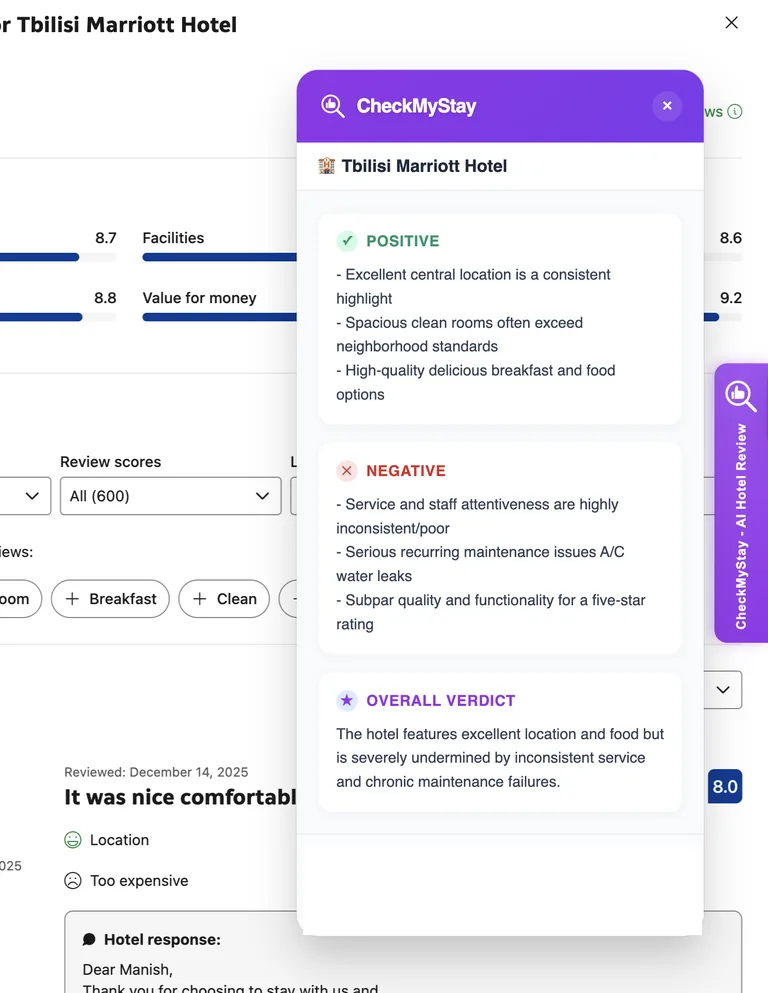
The trade
An evening of reading, back in your pocket.
A popular hotel has hundreds of reviews. You were never going to read them all. Now you don't have to — the extension reads them where they live, inside your browser tab.
…scroll, scroll, scroll, give up, book anyway.
Tbilisi Marriott Hotel
Positive
- Central location guests keep praising
- Spacious, clean rooms
- Breakfast worth waking up for
Negative
- Service at the front desk is a coin flip
- Recurring A/C and water-leak complaints
Verdict
Great location and food — undermined by inconsistent service and maintenance that never seems to get fixed.
Real output from the extension, on a real Booking.com hotel page.
Watch it work
The whole flow in 25 seconds, on one real hotel page.
How it works
The Booking.com review summarizer, in three steps.
Install the extension
One click from the Chrome Web Store. No card, no commitment.
Open a hotel on Booking.com
Browse like you always do. The extension lives inside the tab.
Click. Read the verdict.
The good, the bad, and the bottom line — before you hand over your card.
Hotel reports
See real hotel reports
Every hotel checked with the extension gets a public report: what guests liked, what they warn about, and the verdict. Read a few before you install.
Browse hotel reportsPricing
Pay for the trip, not a subscription.
Start with a free month of 30 hotels. When the next trip comes, one payment covers the whole planning season.
Free month · one per account
Your first month is on us: 30 hotels
The full $15 Trip Pass, free for 30 days. The clock starts when you click, so claim it the day you start comparing hotels.
- 30 hotels in 30 days, 10× the free plan
- No card. Nothing renews
- Unlocks in the extension right away
$0$15
Sign in with Google. It takes 5 seconds.
Free
$0
No card needed
- 3 hotels every 30 days
- Full summary on every hotel — good, bad, verdict
- Sign in with Google
Trip Pass
One payment$15
30 days. Then it simply ends — no auto-renew, nothing to cancel.
- 30 hotels for 30 days, 10× the free plan
- Everything in Free
- Refundable — see the Refund Policy
Prices in US dollars. Creem.io is the merchant of record — it handles the payment, the invoice and the tax.
Questions
Asked before you ask.
Does it work on Airbnb or Hotels.com?
No — Booking.com hotel pages only. That focus is why the summaries are good: the extension knows exactly where the reviews live on the page.
Is the Trip Pass a subscription?
No. $15 once, 30 hotels for 30 days, then it ends on its own. No auto-renew, no cancellation page, no dark patterns.
How does the free month work?
Sign in on this page and press "Get my free month". You get 30 hotels for 30 days, the same as a Trip Pass, with no card. Each account gets it once. When it ends you drop back to 3 hotels every 30 days.
Why do I sign in with Google?
So your unlocked hotels stay attached to you across devices. Your card is never involved until you choose to buy a Trip Pass.
Can I trust an AI summary?
Treat it as a sharp friend who read everything, not as gospel. Summaries can be wrong — the original reviews stay one click away, and the Trip Pass is refundable within 14 days.
The next hotel you book has 600 reviews. Read one.
Install once. Never gamble on a hotel again.
Add to Chrome — free to startFirst month free: 30 hotels · Then 3 free every 30 days or $15 for 30 more · No auto-renew