CheckMyStay vs Google Maps Gemini Review Summaries: Which One Helps You Book on Booking.com?
By Rustam Akhmetov ·

The tab-juggling problem
You found a hotel on Booking.com. The price looks right, the photos look great, and the score looks fine. Then the doubt kicks in: what are guests actually complaining about?
So you do what most travelers do. You open Google Maps in another tab, search for the hotel, scroll to the reviews and read the AI summary there. Now you're comparing two sets of reviews from two sites, and the booking page you started on is buried somewhere behind it.
There's a shorter path.
What Google Maps' Gemini summaries are
It's a good feature, so let's be fair about it. Google describes its review summaries as "AI-generated summaries of places based solely on user reviews". It works on places in general, not only hotels, and Google's developer docs list a range of supported languages and regions. At the consumer launch, 9to5Google reported that "once you open a listing, Gemini will offer a review summary underneath the usual breakdown of ratings," rolling out on Android and iOS in the US.
There are two things to know before you rely on it to book a hotel:
- The summaries are drawn from Google Maps reviews, not from the guests who booked on Booking.com (Google docs).
- Google says plainly: "Review summaries are not guaranteed for all places."
If you want to know what a café or museum is like, it's great. If you're about to pay for a room on Booking.com, it lives in the wrong place.
What CheckMyStay does instead
CheckMyStay is a Chrome extension that works on the Booking.com hotel page itself. It reads that hotel's guest reviews and gives you Positive and Negative sections plus a Verdict, which our site calls "one honest verdict" that arrives "in about ten seconds" (checkmystay.org).
You don't open another tab, and you don't compare one site's reviews with another's. You get the reviews from people who booked through the same platform you're booking on, condensed into a decision.
A real report: ibis Styles Paris Mairie de Montreuil
This is a real CheckMyStay result, not a mock-up.
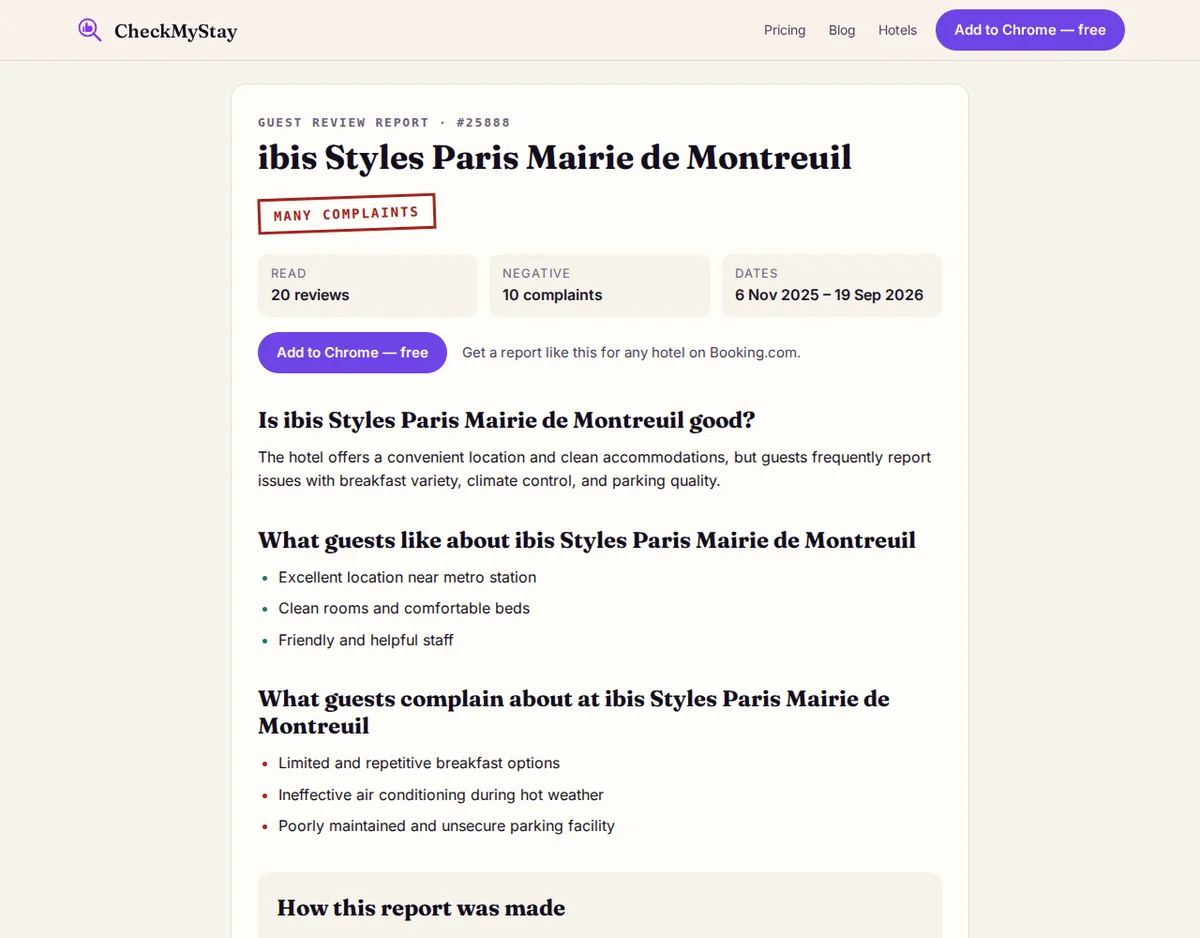
Verdict stamp: MANY COMPLAINTS.
The hotel offers a convenient location and clean accommodations, but guests frequently report issues with breakfast variety, climate control, and parking quality.
Guests like:
- Excellent location near metro station
- Clean rooms and comfortable beds
- Friendly and helpful staff
Guests complain about:
- Limited and repetitive breakfast options
- Ineffective air conditioning during hot weather
- Poorly maintained and unsecure parking facility
To build this report we read 20 Booking.com guest reviews, 10 positive and 10 negative, dated 6 Nov 2025 to 19 Sep 2026 (full public report). Taking equal numbers of positive and negative reviews means the complaints get as much room as the praise.
Think about what this changes. If you're driving to Paris, the parking warning matters right away. If you're travelling in summer, so does the air-conditioning one. With the verdict in front of you, you can decide before you book instead of finding out at check-in.
We're upfront about the limits too. Summaries are made by AI (Claude) from public Booking.com guest reviews. AI summaries can be wrong, so check the reviews yourself. The original reviews stay one click away.
Head to head
- Where it works: Gemini summaries appear inside a Google Maps listing (9to5Google). CheckMyStay works on the Booking.com hotel page you're already on (checkmystay.org).
- Whose reviews: Gemini uses Google Maps user reviews (Google docs). CheckMyStay uses Booking.com guest reviews.
- What you get: Gemini gives you a review summary. CheckMyStay gives you a verdict stamp plus separate "guests like" and "guests complain about" lists.
- Coverage: Gemini covers places of every kind, but Google says summaries are not guaranteed for all places. CheckMyStay is built for Booking.com hotel pages only. It doesn't work on Airbnb or Hotels.com (FAQ).
- Shareable reports: Hotels checked with CheckMyStay get a public report you can send to whoever you're travelling with (example).
Who should pick which
If you're exploring a city and want a quick read on any restaurant, shop or sight, Google Maps is the right tool. If you book hotels on Booking.com and want to know what will annoy you before you pay, CheckMyStay was built for exactly that moment.
Try it on your next booking
It costs nothing to start. The free plan covers 3 hotels every 30 days with a full summary for each. You sign in with Google and no card is needed (checkmystay.org). New accounts can also claim a free month of 30 hotels for 30 days, once per account. If you're planning a bigger trip, the Trip Pass is a one-time $15 for 30 hotels over 30 days. It isn't a subscription and it doesn't auto-renew (pricing).
The next room you book will either match the photos or it won't. Find out first.