CheckMyStay vs Gemini in Chrome: Which One Reads Booking.com Reviews for You?
By Rustam Akhmetov ·

You need a hotel, not a writing exercise
You've found a hotel on Booking.com that looks right. The photos are bright, the score is decent and the price fits. But you know the score doesn't tell the whole story. The broken air conditioning, the cold shower and the awkward check-in are all buried somewhere in the guest reviews.
So you try the obvious shortcut. Chrome now ships with an AI assistant, so you open it and start typing a prompt. Should you ask for a summary? The complaints? Whether it's worth booking? You rephrase and try again. Your coffee goes cold, the tab stays open, and you still don't have a straight answer.
This is the gap between a general assistant and a tool built for one job.
What Gemini in Chrome is
Gemini in Chrome is Google's assistant built into the browser. According to Google's help page, you open it with the "Ask Gemini" button at the top of the browser and opt in the first time. It works with content from your open tabs. Google's examples are wide-ranging. They include summarizing articles, comparing information across pages, adapting recipes and drafting Gmail messages.
There are conditions. Google lists a Chromebook Plus, Mac or Windows computer, the latest Chrome, signing in to Chrome, a supported region and a supported language. Incognito mode isn't supported.
Gemini in Chrome is a capable general assistant. If you want AI help on recipes, articles and email, it's a sensible tool to have.
It isn't built for hotel reviews, though. You decide what to ask, and you work out what the answer means for your trip.
What CheckMyStay is
CheckMyStay is a Chrome extension built for one moment: you're on a Booking.com hotel page and need to know whether to book it.
You don't write a prompt. A CheckMyStay button sits on the right side of the hotel page. You click it, choose Analyze Reviews, and it reads the guest reviews. It returns a positive summary, a negative summary and a verdict, all in a few moments, without you leaving the page.
You don't need to know the right question, and every hotel is checked the same way.
A real example: a Paris hotel with a catch
Here is a real CheckMyStay report for All Suites Appart Hôtel et Hôtel - Paris 13 - Porte d'Italie.
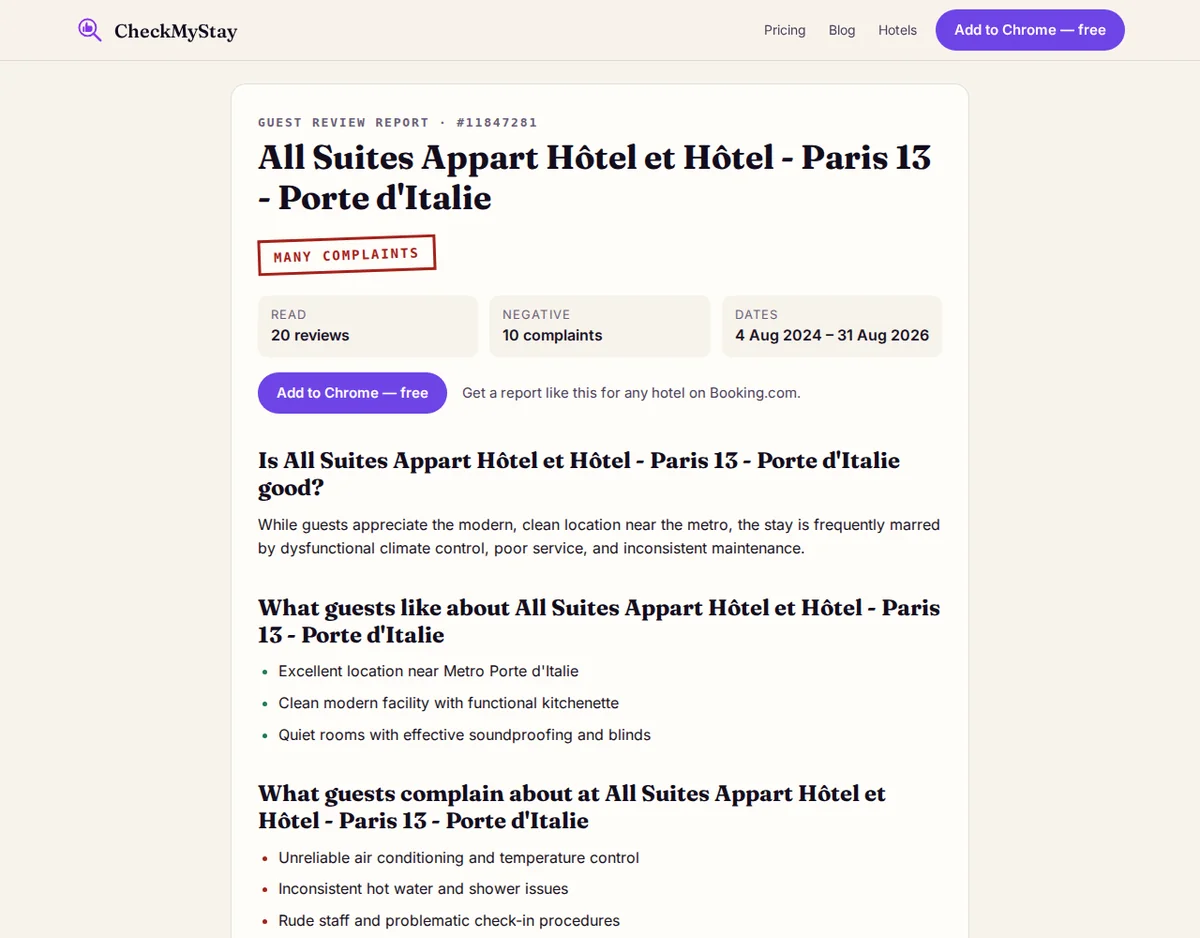
The verdict stamp reads MANY COMPLAINTS.
What guests like:
- Excellent location near Metro Porte d'Italie
- Clean modern facility with functional kitchenette
- Quiet rooms with effective soundproofing and blinds
What guests complain about:
- Unreliable air conditioning and temperature control
- Inconsistent hot water and shower issues
- Rude staff and problematic check-in procedures
The one-line summary: while guests appreciate the modern, clean location near the metro, the stay is frequently marred by dysfunctional climate control, poor service, and inconsistent maintenance.
The photos can't tell you that. The report is based on 20 guest reviews, 10 positive and 10 negative, dated 4 Aug 2024 to 31 Aug 2026. Claude summarized them from public Booking.com reviews. You can read the full public report before you spend anything.
We're also clear about the limits. AI summaries can be wrong, so check the reviews yourself before you book.
Head to head
- Built for: Gemini in Chrome is a general assistant for any page (source). CheckMyStay is built for Booking.com hotel reviews only.
- How you use it: With Gemini, you open "Ask Gemini" and write your own request (source). With CheckMyStay, you click the button on the hotel page, then Analyze Reviews.
- What you get: Gemini answers whatever you asked. CheckMyStay always gives you a positive summary, a negative summary and a verdict.
- Same format for every hotel: With Gemini, that depends on how you word your prompt each time. With CheckMyStay, every hotel gets the same report.
- Shareable reports: Google's help page doesn't mention public hotel reports. CheckMyStay publishes public hotel reports you can open and share.
- Requirements: For Gemini, Google lists signing in to Chrome, a supported region and language, and a Chromebook Plus, Mac or Windows computer (source). For CheckMyStay, you install the Chrome extension and sign in with Google.
- Where it works: Gemini works on any site. CheckMyStay works on Booking.com hotel pages only. Our FAQ says it doesn't work on Airbnb or Hotels.com.
Who should pick which
Use Gemini in Chrome if you want one assistant for everything: articles, recipes, email and comparing tabs.
Use CheckMyStay if you book on Booking.com and want a quick verdict instead of writing prompts while the room you want sells out.
What it costs
The pricing is simple, and it's all on our site:
- Free plan: full summaries for a handful of hotels after Google sign-in. No card needed.
- Free month for new accounts: extra hotels to try, no card, once per account.
- Trip Pass: a one-time payment for a trip's worth of hotels. It doesn't auto-renew, it simply ends, and it's refundable under our Refund Policy.
You won't be signed up for a subscription you forget to cancel.
Check the hotel before you pay for it
The complaints you care about are already in the reviews, but you only benefit if you see them before you pay. Your next Booking.com tab can come with a verdict.
Install CheckMyStay and check your next hotel for free at checkmystay.org →